

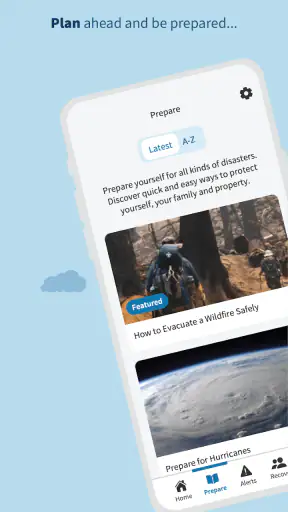
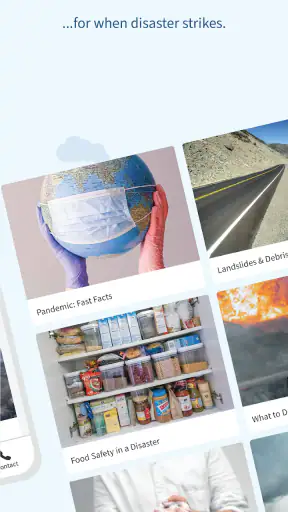
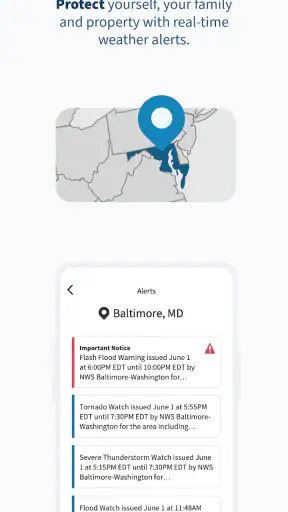
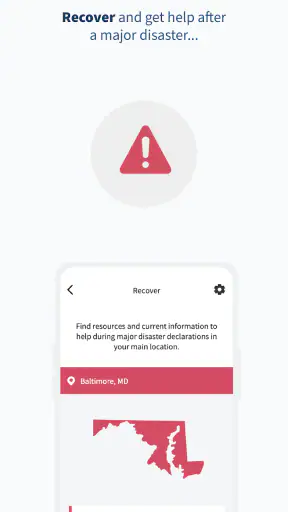
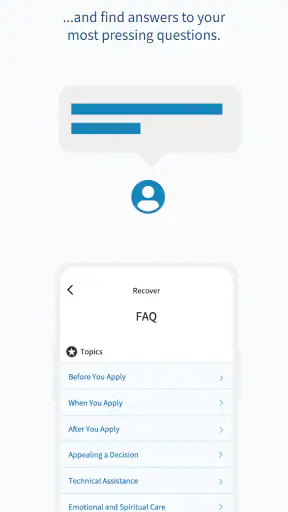
When I first opened FEMA, I expected a straightforward weather utility, but its purpose became clearer after a few minutes: this is an emergency-readiness app rather than a replacement for a full daily forecast service. It comes from the Federal Emergency Management Agency and is free to use, which makes it easy to justify keeping around even if I only need it at important moments. My overall impression is that its value grows when I treat it as a preparedness companion, not as the app I check every morning to decide whether to carry an umbrella.
The distinction matters. A typical weather app is built around temperature, hourly conditions, radar, and short-term planning. FEMA is more useful when the question changes from “What will the weather be like?” to “What should I do if conditions become dangerous?” That focus gives it a practical role on an Android phone, especially for people who want official emergency guidance close at hand without paying for another service. It is rated for Everyone, and its broad audience is one of its strengths: families, students, travelers, older relatives, and people who have never made a disaster plan can all understand why it exists.
What FEMA feels like during the first week
The first-week appeal comes from clarity of purpose. I did not have to wonder whether the app was designed for entertainment, local news, or general lifestyle advice. Its store summary, “Take charge of disasters,” points toward a more deliberate kind of use: preparing before a crisis instead of searching for instructions after one has already started. That makes the app feel more serious than a standard forecast screen, but also less immediately rewarding during calm weather.
I found the best early use was to explore it when nothing urgent was happening. That may sound obvious, yet it is the difference between having useful information ready and trying to learn an unfamiliar tool while dealing with a power outage, evacuation concern, or severe weather alert. I would recommend opening it at home, while the phone is charged, and considering what information would matter to the people in the household. The app becomes more valuable when it is part of a small preparation routine rather than a download made in panic.
Its developer, the Federal Emergency Management Agency, also gives the app a clear identity. I am more comfortable using it as a starting point for emergency preparation than relying on an unknown collection of disaster tips. That does not mean I would blindly follow any single screen during a fast-moving event; official local instructions and emergency services remain important. Still, having a government emergency resource in the same place as my other phone tools feels more dependable than saving a random article and hoping it remains useful later.
One practical workflow is to review the app with another person. I would sit with a family member or housemate, look through the relevant preparedness information, and agree on what we would do if communication became difficult. This turns a private phone installation into a shared habit. It also reveals whether the app suits the people who may actually need it. Someone who prefers visual, step-by-step guidance may appreciate the direct approach, while someone looking only for a detailed local forecast may quickly decide that a dedicated weather app is a better fit.
The app’s average rating is 4.5 from around 5.8 thousand ratings, and it has more than a million installs. Those figures suggest that FEMA has reached well beyond a niche audience, but they do not change the central question I had after trying it: would I remember to open it after the initial curiosity disappeared? For me, the answer depends on attaching it to a real-life trigger, such as the start of hurricane season, a move to a new area, a household emergency-planning day, or a trip where local hazards are unfamiliar.
Where it fits beside ordinary weather apps
I would not install FEMA expecting it to replace the weather app already on my phone. Regular weather services are usually better for quick forecasts and everyday decisions. They are designed for repeated glances, while FEMA earns its place through preparedness and response information. Keeping both can make sense because they answer different questions, but installing FEMA alone will not necessarily give someone the complete daily weather experience they expect.
This is the first important trade-off. The app may feel quiet or limited if I judge it by the standards of a forecast dashboard. If I judge it by whether it helps me think ahead about emergencies, its purpose becomes much stronger. The right comparison is not “Which app shows more weather details?” but “Which resource will I want available when normal routines stop working?” In that comparison, FEMA has a distinct reason to stay installed.
Why its value can survive beyond the first month
After the novelty fades, an emergency app needs recurring value, and FEMA’s lasting usefulness comes from periodic review rather than constant checking. I would not open it every day. Instead, I would revisit it when my circumstances change: moving house, adding a baby or pet to the family, traveling to a region with different hazards, or realizing that the household’s emergency supplies and contact plans have become outdated.
That makes it a maintenance tool for personal preparedness. A useful monthly or seasonal habit is to open the app, review the guidance that applies to current concerns, and then take one small action offline. That action might be checking whether important phone numbers are available without internet access, discussing where everyone would meet, or confirming that essential supplies are not all stored in one inconvenient place. The app cannot perform those tasks for me, but it can prompt the thinking that makes them less likely to be forgotten.
A less obvious strength is that it can help turn vague anxiety into specific preparation. “I should be ready for an emergency” is too broad to act on. A better approach is to use the app as a prompt and ask narrower questions: Which risks are realistic where I live? What would I need if I had to leave quickly? What information would I want if electricity or mobile service became unreliable? This way of using it is more productive than repeatedly browsing without making any decisions.
I also see value for people who help others prepare. A parent can use it as a conversation starter with teenagers, explaining why emergency planning matters without making the discussion overly dramatic. A caregiver can review relevant information with an older relative and identify which instructions need to be written down in an easier format. A teacher, community volunteer, or workplace coordinator may also find the app useful as a reference point, although I would still adapt any plan to the specific location and group.
The free price supports this long-term role. There is no financial barrier to leaving it installed as a reference, and the Everyone age rating makes it easier to recommend across a household. The current version is 3.2.1, and the minimum operating system is Android 6.0, so compatibility should cover many older Android phones. That is especially relevant for emergency preparation: a useful resource is more practical when it does not require everyone to own a recent device.
Still, recurring value is not the same as daily engagement. I would not call FEMA a habit-forming app in the way a forecast widget or news service can be. Its best habit is occasional and intentional. If I need a notification-driven system that constantly watches local conditions, I would look to a dedicated alert service or local authority channel as well. FEMA works better as part of a wider safety setup than as the only thing I rely on.
How I would build a realistic routine around it
My preferred routine would be short enough to repeat. At the beginning of a season when severe weather is more likely, I would open the app and review the relevant material. I would then write down any actions that apply to my household, discuss them with the people involved, and return later to check whether those actions were completed. The important point is to move from reading to doing; otherwise, the app becomes a reassuring object on the phone rather than a useful part of preparedness.
For travel, I would use it before leaving rather than during an emergency. If I were visiting a place with unfamiliar risks, I would review the app while planning the trip, save the key ideas in a form I could access easily, and learn which local sources should be followed once I arrived. That workflow avoids a common mistake: assuming that a national emergency resource can replace local instructions. FEMA can help me prepare my thinking, but local authorities are the ones I would watch for location-specific directions.
The maintenance burden is low, but attention still matters
FEMA is not demanding in the usual sense. I am not dealing with a subscription, a complicated content-creation process, or a tool that needs constant customization to remain useful. The main maintenance burden is mental: I have to remember that emergency preparation becomes stale when my household, location, or responsibilities change. The app can remain installed for a long time, but leaving it untouched does not automatically mean I am prepared.
That is why I would pair the app with a calendar reminder rather than depending on memory. A seasonal reminder can prompt a quick review without turning safety into an exhausting project. I would also revisit the app after a major move or change in household circumstances. This approach keeps the maintenance realistic. It avoids both extremes: ignoring preparedness completely and trying to study every possibility in detail every week.
There is another practical limitation: a phone app is not a complete emergency kit. If a device is lost, damaged, uncharged, or disconnected, the information inside it may be difficult to reach. I would not let the convenience of FEMA discourage me from keeping important contacts, meeting points, and essential instructions available in another form. The app is strongest as one layer of preparation, not as the single place where every safety decision lives.
Users should also think about the difference between information and action. Reading instructions can create the feeling of progress without changing what happens in a real emergency. My advice is to use each session to produce one concrete result. If the app reminds me to think about communication, I should decide how the household will communicate. If it raises a concern about evacuation, I should discuss routes and responsibilities. That conversion from screen time to a real-world decision is where the app earns its storage space.
For an older phone, the Android 6.0 minimum is helpful, but I would still install and check the app before an urgent situation, not for the first time during one. Any emergency resource deserves a trial run so I know how it feels to navigate and whether it fits my expectations. This is particularly important for people who are less comfortable with smartphones. A family member may need help finding the information they would use, and that support is much easier to provide in a calm setting.
What may become tiring over time
The biggest source of fatigue is the app’s subject matter itself. Disaster preparation is important, but it can feel heavy when presented without an immediate reason. If I open FEMA every day hoping for fresh entertainment or a constantly changing forecast, I will probably stop using it. Its serious tone is appropriate, yet that same seriousness means it needs a clear place in my routine.
Another possible frustration is the gap between national guidance and personal context. Advice can be useful at a broad level, but my exact needs depend on where I live, who lives with me, how I travel, and which local services are available. I may have to do additional work to translate general preparedness ideas into a plan that makes sense for my building or neighborhood. I consider that a reasonable limitation, but it is still work the user must be willing to do.
There is also a risk of using it as a substitute for live information. In a developing emergency, I would not depend on a stored app alone for changing road conditions, evacuation orders, shelter availability, or local instructions. I would check official local channels and follow emergency personnel. FEMA can help me prepare before the event and think more clearly during it, but it should not encourage false confidence that one app covers every urgent update.
People who want a polished, all-in-one weather experience may therefore feel disappointed. A conventional weather app is likely the better choice for hourly planning, quick forecast checks, and regular outdoor decisions. Someone who already has a trusted emergency plan and never wants preparedness material on a phone may also see little reason to install FEMA. I would skip it for those users unless they are willing to give it a specific role.
On the other hand, I would recommend it to people who keep postponing emergency preparation because it feels complicated. The app gives that vague task a clear starting point. It is also a good fit for households that have recently moved, people preparing for travel, and anyone who wants a free official resource available on an older Android device. The benefit is not constant novelty; it is the reduction of friction when deciding what to think about first.
My long-term verdict on keeping FEMA installed
After the first-week curiosity fades, FEMA does not need to compete for daily attention. Its lasting case is quieter: it remains useful when I review it occasionally, connect its guidance to actual household decisions, and remember that emergency readiness needs updating. That is a different kind of app value from entertainment or daily convenience, but it is a legitimate one.
I would keep it installed as a reference, while using a regular weather service and local emergency channels for their more specialized jobs. The combination is more sensible than asking FEMA to be a complete forecast, alert, planning, and response system by itself. Its free cost, Everyone rating, broad Android compatibility, and established presence make that recommendation easy, provided expectations are realistic.
The app is not the right choice for someone seeking detailed everyday forecasts or a constantly engaging interface. It also cannot replace a charged phone, offline planning, local instructions, or conversations with the people who share responsibility for safety. Those limits matter, and ignoring them would make the review unfair. Yet they do not cancel its central strength: it encourages preparation before an emergency makes preparation difficult.
My final judgment is that FEMA earns lasting space when I give it a job. I would use it during seasonal check-ins, before unfamiliar travel, after moving, and whenever my household’s needs change. I would then turn what I learn into a practical action rather than simply closing the app. Used that way, it is a modest but worthwhile emergency preparedness app—not exciting, not a replacement for a forecast service, but genuinely useful when the goal is to be less unprepared.
For me, that is enough to recommend it. The strongest reason to keep FEMA is not that I will open it constantly; it is that I may be grateful I opened it before I needed it.


